TITLE: Buda Mandala
MY ROLE: Coder
SOFTWARE: Adobe Dreamweaver
HARDWARE: Dell XPS 2022
DURATION: 0’18”
DIMENSIONS: 1000 x 1000px
CLASS: FMX 310 – Creative Coding
PROFESSOR: Santiago Echeverry
SEMESTER: SP 22
INSTITUTION: The University of Tampa
DESCRIPTION: This was another iteration of the Mandala project we did in this class. This time we were able to use our own assets and the images I used were pictures of my cat, my friend’s dog, and myself! This project was a lot of fun to do because it’s all pictures that have meaning to me. Ultimately this one tuned to be my favorite as well because of the Mandala effect all the images give. I also added an interactive element where you can move the dogs head around with the cursor.
TITLE: Kinetic Typography
MY ROLE: Coder
SOFTWARE: Adobe Dreamweaver
HARDWARE: Dell XPS 2022
DURATION: 0’12”
DIMENSIONS: 1000 x 1000px
CLASS: FMX 310 – Creative Coding
PROFESSOR: Santiago Echeverry
SEMESTER: SP 22
INSTITUTION: The University of Tampa
DESCRIPTION: For the typography project I didn’t have a particular theme, so I used whatever words came to mind. This project was interesting to me because I never made any type of art that is a type of typography. I liked the way my animations turned out in the end, and I thought the colors worked nice but, I do think having a theme could have a made it much better. Having a theme would’ve helped me think of better words that relate and I think it could have told more of a story.
TITLE: Illustrator Mandala
MY ROLE: Coder
SOFTWARE: Adobe Dreamweaver
HARDWARE: Dell XPS 2022
DURATION: 0’17”
DIMENSIONS: 1000 x 1000px
CLASS: FMX 310 – Creative Coding
PROFESSOR: Santiago Echeverry
SEMESTER: SP 22
INSTITUTION: The University of Tampa
DESCRIPTION: Another iteration of the mandala we did we the illustrator mandala. For this project I went into Illustrator and created a bunch of different objects from scratch while using references and then saving them as images to animate in the code. Although I started to feel a little bit better with coding this time around, there were still some things that could have been improved. Some areas that I would fix up is the background and some of the images used.
TITLE: Vector Mandala
MY ROLE: Coder
SOFTWARE: Adobe Dreamweaver
HARDWARE: Dell XPS 2022
DURATION: 0’14”
DIMENSIONS: 1000 x 1000px
CLASS: FMX 310 – Creative Coding
PROFESSOR: Santiago Echeverry
SEMESTER: SP 22
INSTITUTION: The University of Tampa
DESCRIPTION: This was one of the first versions of the Mandala we did in this class. I still felt somewhat new to coding, and I didn’t quite have an idea, so I took this project as experimenting. I feel like one area that is weak is it didn’t have that vector feeling behind it and it felt very empty. Besides using images, I only really knew how to do gradient backgrounds and that’s another area I would have changed.
TITLE: Gym Session
MY ROLE: Coder
SOFTWARE: Adobe Dreamweaver
HARDWARE: Dell XPS 2022
DURATION: 0’15”
DIMENSIONS: 1000 x 1000px
CLASS: FMX 310 – Creative Coding
PROFESSOR: Santiago Echeverry
SEMESTER: SP 22
INSTITUTION: The University of Tampa
DESCRIPTION: The idea behind this project was to create elements that use eternal motion. Since I work out a lot and I like to be active, I thought my motions should include me lifting weights in some way in front of a gym background. I had to take a picture and cut out different parts of me to animate them. In the end this was one project I struggled with. I had a difficult time locating and placing the cut-out parts I used in the right spot to make it look like I am actually bending my arm. Some of the objects would move but in the wrong spot and other objects would move in place.
TITLE: Avengers Video Game
MY ROLE: Coder
SOFTWARE: Adobe Dreamweaver
HARDWARE: Dell XPS 2022
DURATION: 0’35”
DIMENSIONS: 1000 x 1000px
CLASS: FMX 310 – Creative Coding
PROFESSOR: Santiago Echeverry
SEMESTER: SP 22
INSTITUTION: The University of Tampa
DESCRIPTION: This was the final in our class and we had to create a video game. I chose to do an Avengers theme which allows you to play as a hero and you must hover your cursor over the flying objects to collect them in every level and if you don’t before the timer runs out you lose. I thought my idea for this game was really good, but the execution didn’t work out so great. The hero you play as isn’t attached to your cursor properly and it’s also way too big. In addition, my backgrounds weren’t working but my idea for those was I had to include some of image of a battle from each of the Avengers films for each level.
TITLE: Buda Sprite Sheet
MY ROLE: Coder
SOFTWARE: Adobe Dreamweaver
HARDWARE: Dell XPS 2022
DURATION: 0’36”
DIMENSIONS: 1000 x 1000px
CLASS: FMX 310 – Creative Coding
PROFESSOR: Santiago Echeverry
SEMESTER: SP 22
INSTITUTION: The University of Tampa
DESCRIPTION: For this project we made a sprite sheet, and I started off by doing different 5 different motions. These motions include me dancing, swinging a bat, shooting a basketball, swinging a golf club, and hitting a volleyball. This was another project where I had the right idea in mind, but I wasn’t able to execute properly. For one, there are these weird effects that show up during each sequence of me moving. Also, most of the motions include me doing some type of sports movements with 1 movement being dancing and I feel like I could have had a better background to go along those movements.
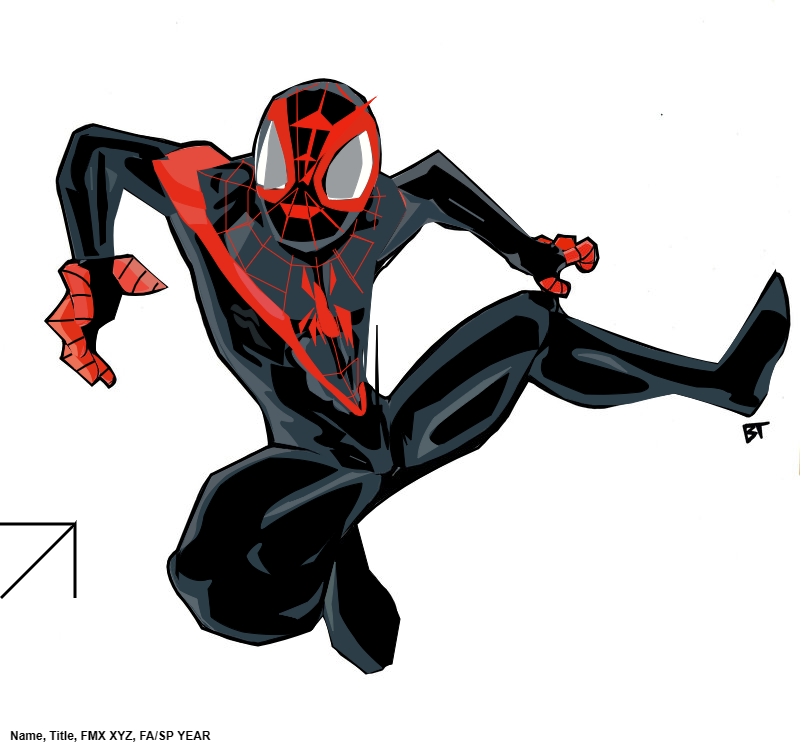
TITLE: Miles Morales Portrait
MY ROLE: Coder
SOFTWARE: JavaScript
DIMENSIONS: 1200 x 1800px
CLASS: FMX 310 – Creative Coding
PROFESSOR: Santiago Echeverry
SEMESTER: SP 22
INSTITUTION: University of Tampa
DESCRIPTION: This was our first major assignment in this class, and I chose to recreate the character ‘Miles Morales’. We did this by going on the canvas and then finding the x and y coordinates and drawing shapes with lines and those coordinates. I thought mine turned out well, but there were some areas that could use some improving like the shapes and some of the fill-in colorings. The hardest part of this was going back to your canvas and finding the right x and y coordinates with your cursor to make sure everything lines up properly when building your shapes.
TITLE: Shape Illusion
MY ROLE: Coder
SOFTWARE: Adobe Dreamweaver
HARDWARE: Dell XPS 2022
DURATION: 0’10”
DIMENSIONS: 1000 x 1000px
CLASS: FMX 310 – Creative Coding
PROFESSOR: Santiago Echeverry
SEMESTER: SP 22
INSTITUTION: The University of Tampa
DESCRIPTION: This was the first project we did in this class and my first time ever really coding something. There wasn’t any big idea behind this, it’s more of just a way to get the basics down and to practice with the software.