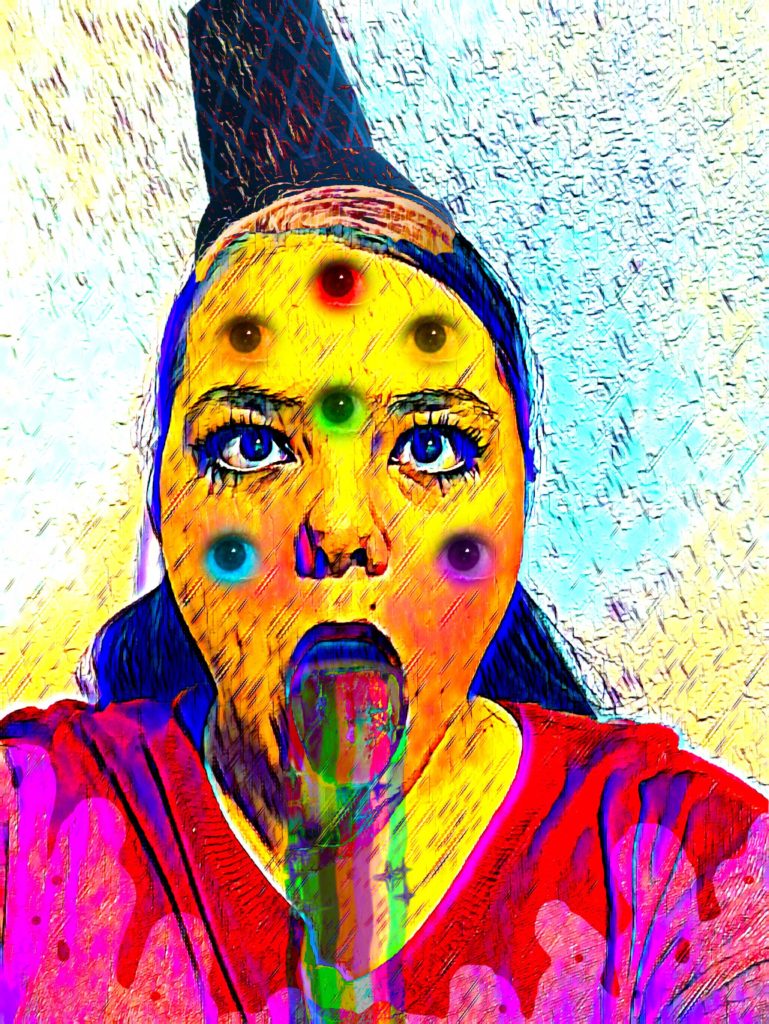
TITLE: Autoscopy
MEDIA: Digital Illustration
SOFTWARE: Adobe Photoshop
HARDWARE: Macbook Pro 2019
SPECIFICATIONS: 2000X2662px, RGB, 72DPI
CLASS: FMX 210 Digital Media
PROFESSOR: Santiago Echeverry
SEMESTER / TERM: FA 21
INSTITUTION: University of Tampa
LINK: https://maddywessling.blogspot.com/2021/12/autoscopy.html
DESCRIPTION: “Autoscopy” is one of a few of the same edited picture within Adobe Photoshop. It is inspired by ice cream and the melting process that ice cream naturally goes through. With my anxiety disorder, sometimes it feels like my brain is melting, and I wanted to portray that in this image. Taking a photo that was originally me making a face, I turned it into a different photo by adding more eyeballs, a rainbow, and an ice cream cone hat. I also played with different filters and effects in order to make the background and different textures within the image.


TITLE: Black and White to Color
MEDIA: Digital Illustration
SOFTWARE: Adobe Photoshop
HARDWARE: Macbook Pro 2019
SPECIFICATIONS: 2320X3088px, RGB, 72DPI
CLASS: FMX 210 Digital Media
PROFESSOR: Santiago Echeverry
SEMESTER / TERM: FA 21
INSTITUTION: University of Tampa
LINK:https://maddywessling.blogspot.com/2021/12/bw-to-color.html
DESCRIPTION: “Black and White to Color” is the same picture edited within Photoshop using three different color palettes. The first image palette is a square, the second is analogous, and the third is complementary. My first step was to take an image of myself with a plain background and turn the image into black and white using a filter. Then I used Adobe Color to create the three palettes. Afterwords, I took each image in Photoshop and masked every area of the image. Finally, I added the colors. Looking back on this project, I can see where the lines aren’t perfect within the hair and eye shapes, but overall, I really enjoy the color palettes of this project and how everything works together.

TITLE: Multiplicity
MEDIA: Digital Illustration
SOFTWARE: Adobe Photoshop
HARDWARE: Macbook Pro 2019
SPECIFICATIONS: 4032X3024px, RGB, 72DPI
CLASS: FMX 210 Digital Media
PROFESSOR: Santiago Echeverry
SEMESTER / TERM: FA 21
INSTITUTION: University of Tampa
LINK:https://maddywessling.blogspot.com/2021/11/multiplicity-project.html
DESCRIPTION: “Multiplicity” is many images combined into one using Photoshop. For this project, I had my mom help me center a camera and keep it in one place using a tripod in our living room. Then our dachshund Coco and I dressed up in different outfits and took pictures together six different times. Afterwards, I uploaded each image into Photoshop and chose the blank image of the area and then edited each picture to look like they are all apart of one single image. This project was a lot of fun because I got to dress up with Coco and play around with different poses and costumes!
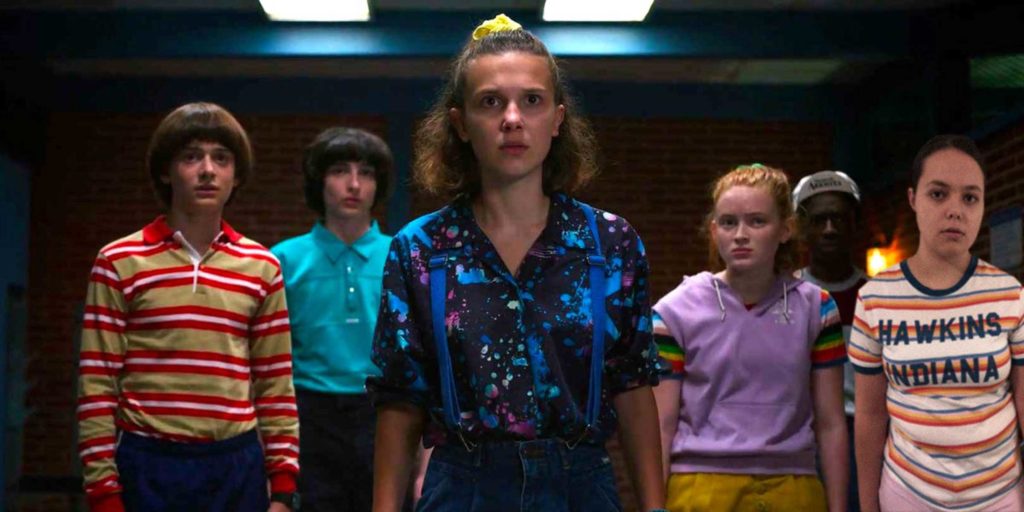
TITLE: Somewhere
MEDIA: Digital Illustration
SOFTWARE: Adobe Photoshop
HARDWARE: Macbook Pro 2019
SPECIFICATIONS: 2400X1200px, RGB, 72DPI
CLASS: FMX 210 Digital Media
PROFESSOR: Santiago Echeverry
SEMESTER / TERM: FA 21
INSTITUTION: University of Tampa
LINK:https://maddywessling.blogspot.com/2021/11/somewhere-project.html
DESCRIPTION: “Somewhere” is an image taken from the TV show ‘Stranger Things’ with myself added into it. I personally love Stranger Things and being in the show would be a dream come true. I took an image taken against a green wall in my house and cut out myself from it. Afterwards I took that mask of myself and placed it into the Stranger Things image. I then finished it off by editing myself to match the colors and textures of the image. I had a lot of fun with this project as well, getting to wear my Stranger Things shirt and messing around with filters during editing.